
What is the Media Conversion Station?
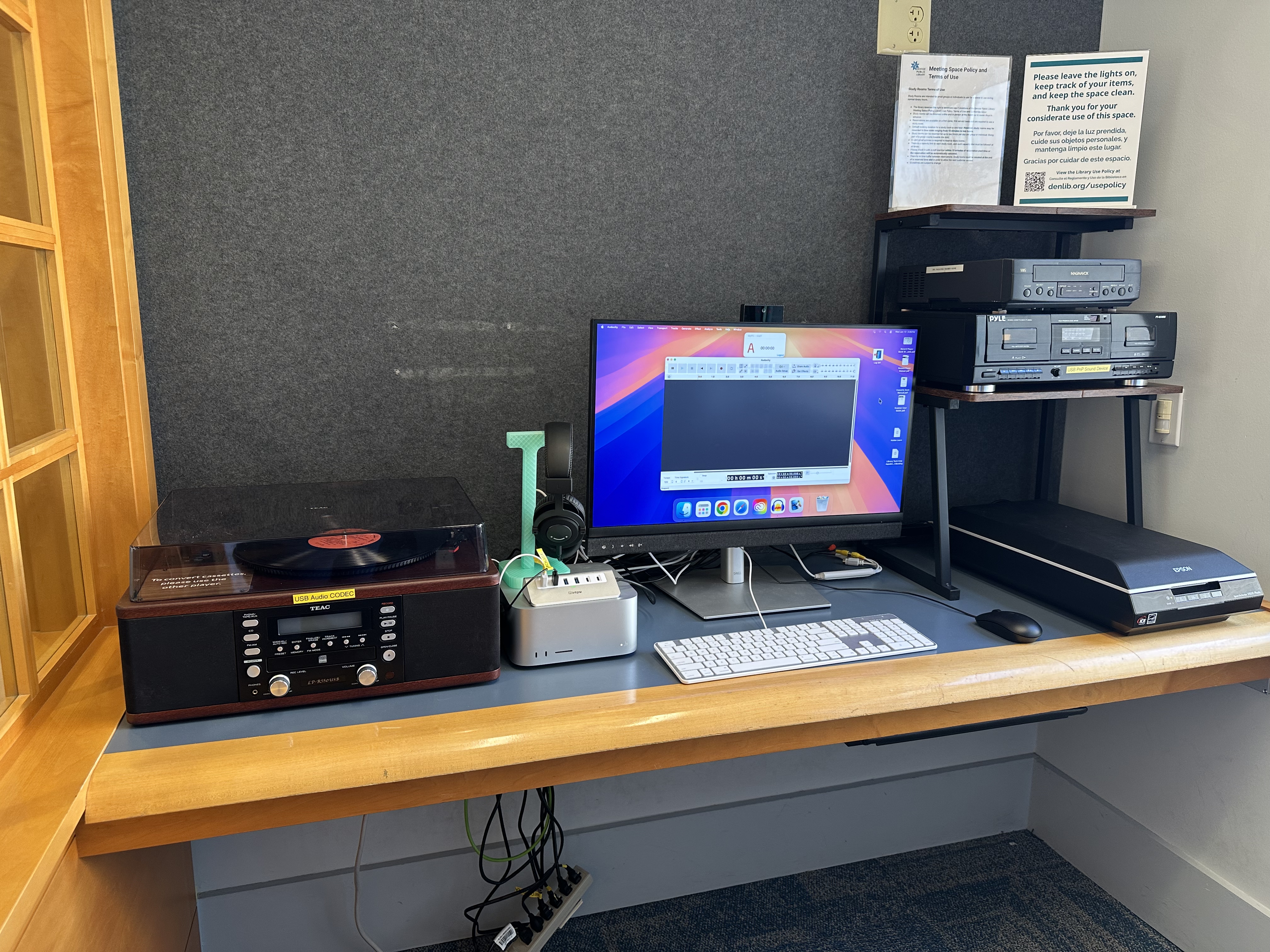 The Media Conversion Station is a self-service space where you can record audio and convert analog media to digital formats. You can convert photos, slides, negatives, VHS tapes, cassettes, and records into digital files. Adobe Creative Cloud apps are also available.
The station is available by reservation for up to two hours per day. A library card is required to book and use the space.
Whether you're a first-time visitor or a returning customer, here's what you need to know before you book.
First Time Using the Media Conversion Station?
If you're new to the station, we recommend booking a one-on-one tech appointment at the same time as your station reservation before you arrive. A staff member will walk you through the equipment so you can use it safely and confidently.
Tech appointments are limited, so we encourage you to secure that first.
How to Reserve the Media Conversion Station
The station is located on the 4th floor of the Central Library, inside the Community Technology Center.Reservations are available during library operating hours. You can book up to 2 hours per day, with one session allowed per day (even if you’re in a group).
A library card is required. If you use an eCard for your reservation, you will need to update your eCard account to a permanent library card upon arrival by presenting an official picture ID.
Book the Media Conversion Station
The Media Conversion Station is designed for self-guided use, with instructions available to help you get started. If you’d like additional support, you can schedule a one-on-one appointment by calling the Community Technology Center at 720-865-1706 or email ctc@denverlibrary.org.
What is Available to Use?
The station includes one computer workstation for recording audio, converting analog media to digital formats, and editing digital media. Users are responsible for the following equipment during reservation.
- Mac Desktop
- Keyboard & Mouse
- Headset
- Vinyl Record/Tape Player
- Epson flatbed Scanner with 35mm film, slides, and medium format film (please request carriers at check-in)
- VCR/DVD Player
- Pyle dual cassette deck
- Adobe Creative Cloud (Photoshop, Premiere, Illustrator, etc.)
- Audacity
- Elgato Video Capture
FAQ
What are the policies for the Media Conversion Station?
When using the Media Conversion Station, we ask that you follow a few guidelines to help keep the space safe and ready for everyone:
- Use the space for media conversion and editing
- No food or drink at the Station
- Please don’t unplug or rearrange equipment
- Leave the space clean, organized, and ready for the next user
- Check in and out at the front desk
How do I access the Media Conversion Station?
Book the station online.
On the day of your visit, arrive a few minutes early to check in. A staff member will get you set up and check you out when you’re finished. If you do not check in within the first 15 minutes of your reservation, your reservation will be cancelled.
Can I get help using the Media Conversion Station?
The Media Conversion Station is designed for self-guided use. If you'd like hands-on guidance before your visit, please schedule a one-on-one tech appointment in advance.
If you have questions or concerns on the Media Conversion Station contact the Community Technology Center at 720-865-1706 or by email ctc@denverlibrary.org.